SQLModel is a Object Relational Mapper (ORM) library that provides an abstraction to working with databases. Instead of executing SQL queries you can manipulate database data by using Object Oriented programming code.
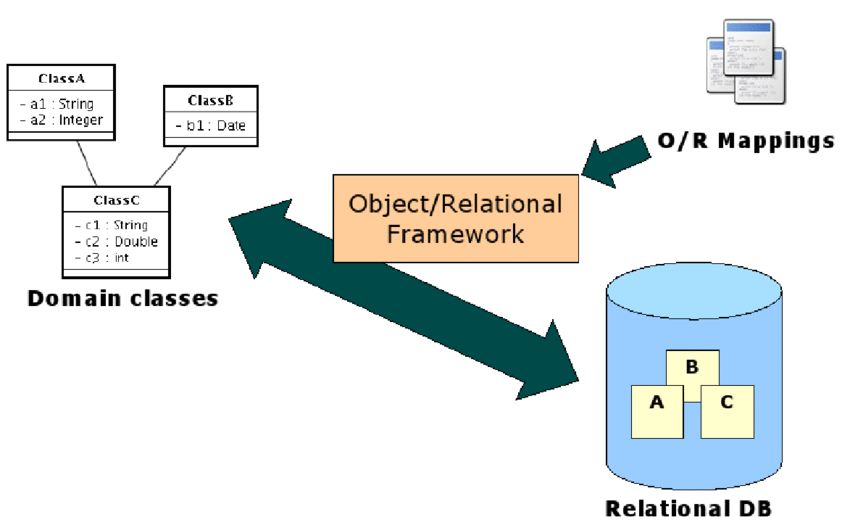
In general, there are MANY databases you may have to work with in the future such as
- PostgreSQL
- MySQL
- SQLite
- Oracle
- Microsoft SQL Server
- MongoDB
- Cassandra
- etc.
Each database may have slight variances in syntax and language such as
- PL/SQL (Used by oracle)
- PL/pgSQL (Used by postgres)
- TSQL (Used by Microsoft SQL server)
- etc
Learning the nuances and variants of the SQL language based on the database an application uses can get quite tedious. ORMs act as an abstraction layer so that it doesn't matter what the target database is, the ORM will handle the underlying SQL commands. You'd just be responsible for writing standardized OOP code.
In this codelab you will:
- Learn how to define models
- Create objects that persist in a database
- Get an introduction to CLI commands
- Learn how to retrieve objects
- Learn how to Update objects
- Handle errors
- Delete objects
- Map relationships
- Mutate related data
- Handle complex relationships
Task 1
Start by forking (not cloning) this repository to your github account. Follow the same steps from lab 1 to clone YOUR copy of the code onto your workstation. Open the folder in VSCode and install the dependencies by creating the virtual environment and installing the dependencies.
It's okay if you don't know the commands off hand, it's only week 2. Just click here and run the steps of the highlighted section
This lab will give an introduction to data manipulation using a SQLite database. Similar to Lab 1, go to the extension marketplace and install the following extension. It would help you view the data in your database for this lab.

Type Hinting
In lab 1, we've introduced variables in python
Type hinting (or type annotation) is a way to describe the expected data types of variables, function parameters, and return values in Python.
Python does not enforce these types at runtime — they're mainly for:
- readability
- catching bugs early
- better editor autocomplete and static analysis
def add (a: int, b:int) -> int:
	return a+b
Models are python classes which eventually become database tables. Objects created from models reflect a table row record.
When you open the workspace and view the contents of models.py. You should find a user class which is specified according to SQLModel's documentation.
class User(SQLModel, table=True):
	id: Optional[int] =  Field(default=None, primary_key=True)
	username:str = Field(index=True, unique=True)
	email:str = Field(index=True, unique=True)
	password:str
Note: We use Optional[int] for the primary key field so that in Python code we can create an object without an id (id=None), assuming the database will generate it when saving. SQLModel understands that the database will provide the id and defines the column as a non-null INTEGER in the database schema.
Model Methods
Models can also contain methods. We will need methods on our classes to perform some common operations on its instances. We shall define 3 methods:
__init__(): This is the constructor of the class, used to make class instances
set_password(): Because this is the model which handles user accounts we define this method which would hash user passwords
__str__(): This method returns a String representation of an instance of the model used for printing objects to the console.
Task 3
Add the following methods to the User class
def __init__(self, username, email, password):
    self.username = username
    self.email = email
    self.set_password(password)

def set_password(self, password):
    self.password = password_hash.hash(password)

def __str__(self) -> str:
	return f"(User id={self.id}, username={self.username} ,email={self.email})"
Now that our models are created we can start saving data in our application. When you open cli.py you will see a script for a cli application using typer. We can add various functionalities to our command line application by defining commands. There is an initialize command already available for us.
import typer
from app.database import create_db_and_tables, get_session, drop_all
from app.models import User
from fastapi import Depends
from sqlmodel import select
from sqlalchemy.exc import IntegrityError


cli = typer.Typer()

@cli.command()
def initialize():
    with get_session() as db: # Get a connection to the database
        drop_all() # delete all tables
        create_db_and_tables() #recreate all tables
        bob = User('bob', 'bob@mail.com', 'bobpass') # Create a new user (in memory)
        db.add(bob) # Tell the database about this new data
        db.commit() # Tell the database persist the data
        db.refresh(bob) # Update the user (we use this to get the ID from the db)
        print("Database Initialized")
Task 4.1
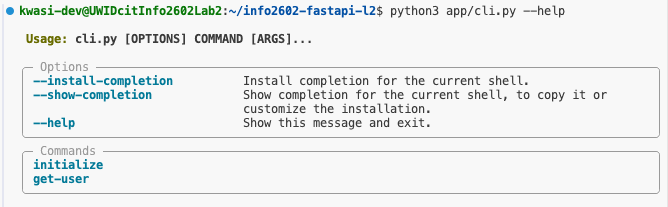
Test the command by running python3 app/cli.py --help in the terminal. Note that you may have to modify the path based on the folder your terminal is set to. You should see output similar to the following.
Note under the "Commands" section. It would show us a list of commands we can run. You can ignore the "Options" section for now.
Task 4.2
Initialize the database by running the command python3 app/cli.py initialize
This should initialize the database and create the user.

We can query objects from our database by using the functions available on the database object. Assuming you have a db variable that references the database
db.get(Model, model_id): Gets a SINGLEModelidentified by themodel_idparameter you providedb.exec(select(Model)).all(): Gets ALLModels in the databasedb.exec(select(Model).offset(m).limit(n)).all(): GetsnModels in the database starting from themthobjectdb.exec(select(Model).where(Model.email == 'john@uwi.edu')).all(): Gets allModels that match the criteria
Model is any class that extends SQLModel such as those defined in models.py
Task 5.1
Lets add a command to retrieve a user by their username and print it.
@cli.command()
def get_user(username:str):
    with get_session() as db: # Get a connection to the database
        user = db.exec(select(User).where(User.username == username)).first()
        if not user:
            print(f'{username} not found!')
            return
        print(user)
Test out the function by executing the following commands
python app/cli.py get-user johnpython app/cli.py get-user bob

Task 5.2
Create a command to get all user objects.
@cli.command()
def get_all_users():
    with get_session() as db:
        all_users = db.exec(select(User)).all()
        if not all_users:
            print("No users found")
        else:
            for user in all_users:
                print(user)
To make changes to an object simply reassign a new value to the desired property then save the object to the database.
Task 6
Add a command to update the email of a user.
@cli.command()
def change_email(username: str, new_email:str):
    with get_session() as db: # Get a connection to the database
        user = db.exec(select(User).where(User.username == username)).first()
        if not user:
            print(f'{username} not found! Unable to update email.')
            return
        user.email = new_email
        db.add(user)
        db.commit()
        print(f"Updated {user.username}'s email to {user.email}")
Verify the results using any of the commands you would've used creted in the previous section or by viewing the database.
As our usernames and email have the unique constraint, we cannot reuse usernames or emails for new users. It is important that our apps anticipate such edgecases of otherwise valid input and fail gracefully instead of crashing.
These failure cases are called exceptions and we perform exception handling so that our application can fail gracefully and provide a useful message to the user.
Task 7
Implement a create-user command but handle any errors thrown by the database due to unique constraint violations.
@cli.command()
def create_user(username: str, email:str, password: str):
    with get_session() as db: # Get a connection to the database
        newuser = User(username, email, password)
        try:
            db.add(newuser)
            db.commit()
        except IntegrityError as e:
            db.rollback() #let the database undo any previous steps of a transaction
            #print(e.orig) #optionally print the error raised by the database
            print("Username or email already taken!") #give the user a useful message
        else:
            print(newuser) # print the newly created user
Now we can safely add new users to the application

Deletion is also easily done by simply using the db.delete() method then calling db.commit() to save the changes to the database.
Task 8
Create a command that will delete a user using db.delete()
@cli.command()
def delete_user(username: str):
    with get_session() as db:
        user = db.exec(select(User).where(User.username == username)).first()
        if not user:
            print(f'{username} not found! Unable to delete user.')
            return
        db.delete(user)
        db.commit()
        print(f'{username} deleted')
The next two sections are exercises that you should attempt and submit them for this lab in myElearning
Exercise 1
Create a cli command that allows you to find a user using a partial match of their email OR username.
Exercise 2
Create cli command that allows you to list the first N users of the database to be used by a paginated table. The command should accept 2 arguments limit and offset and return the appropriate result. limit should be defaulted to 10 and offset should be defaulted to 0
Exercise 3
Modify all the existing cli commands and add help statements for all arguments and documentation for all the functions