This lab shall take you through the initial steps of your project.
Create Github Organization
Firstly you shall need a github organization for your group. You can have a member create one from the github homepage.
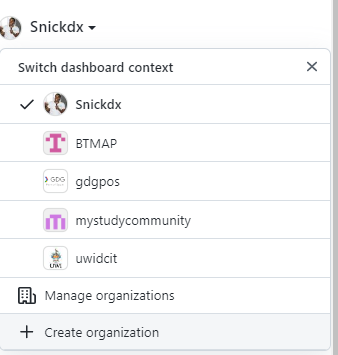 Select the free option then complete the organization setup at the next step.
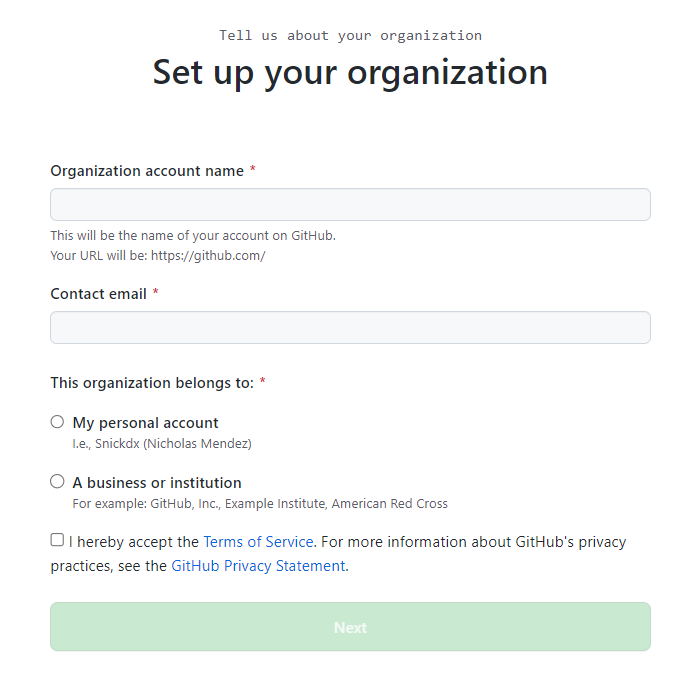 After the organization is created you can navigate to the teams tab and invite your group members.
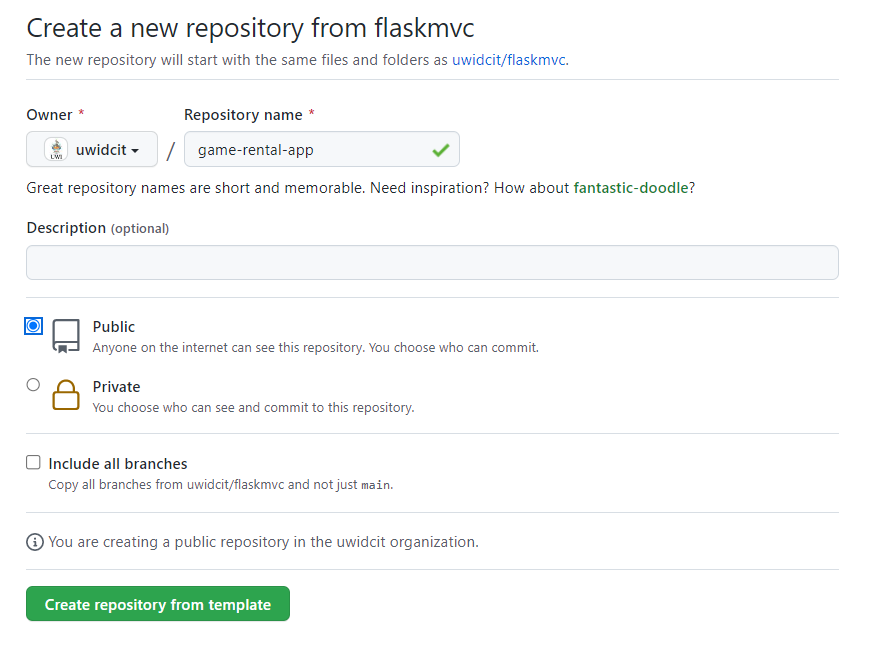
Next create your repository from the fastapi project starter template under your organization.
 In your repository's setting you navigate to the collaborators section and ensure your group members are added with write access.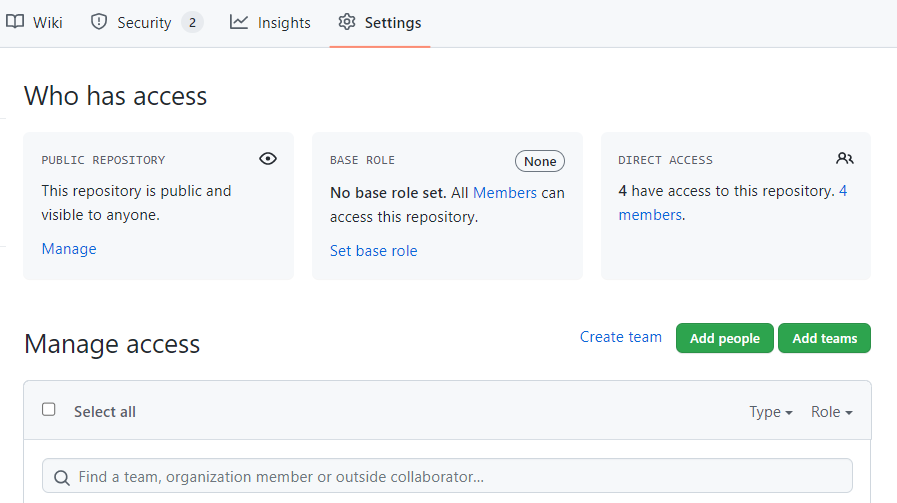
It's a good idea to deploy code as soon as possible so you can know when future code commits break your deployed application. Next login to render.com and follow the same deployment steps as covered in the deployment lab.
Software projects should be planned. Good planning and documentation can ensure all the developers are on the same page with respect to requirements, specifications and design decisions made by the team.
The remainder of the lab will be on the following case study.
Problem Description
A game store wishes to allow customers to rent games from each other.
Solution Description
A web app to manage rentals, make rentals and handle returns and payments.
Features
User Account View Game Catalog Borrow games, limited to collateral Submit games for rental
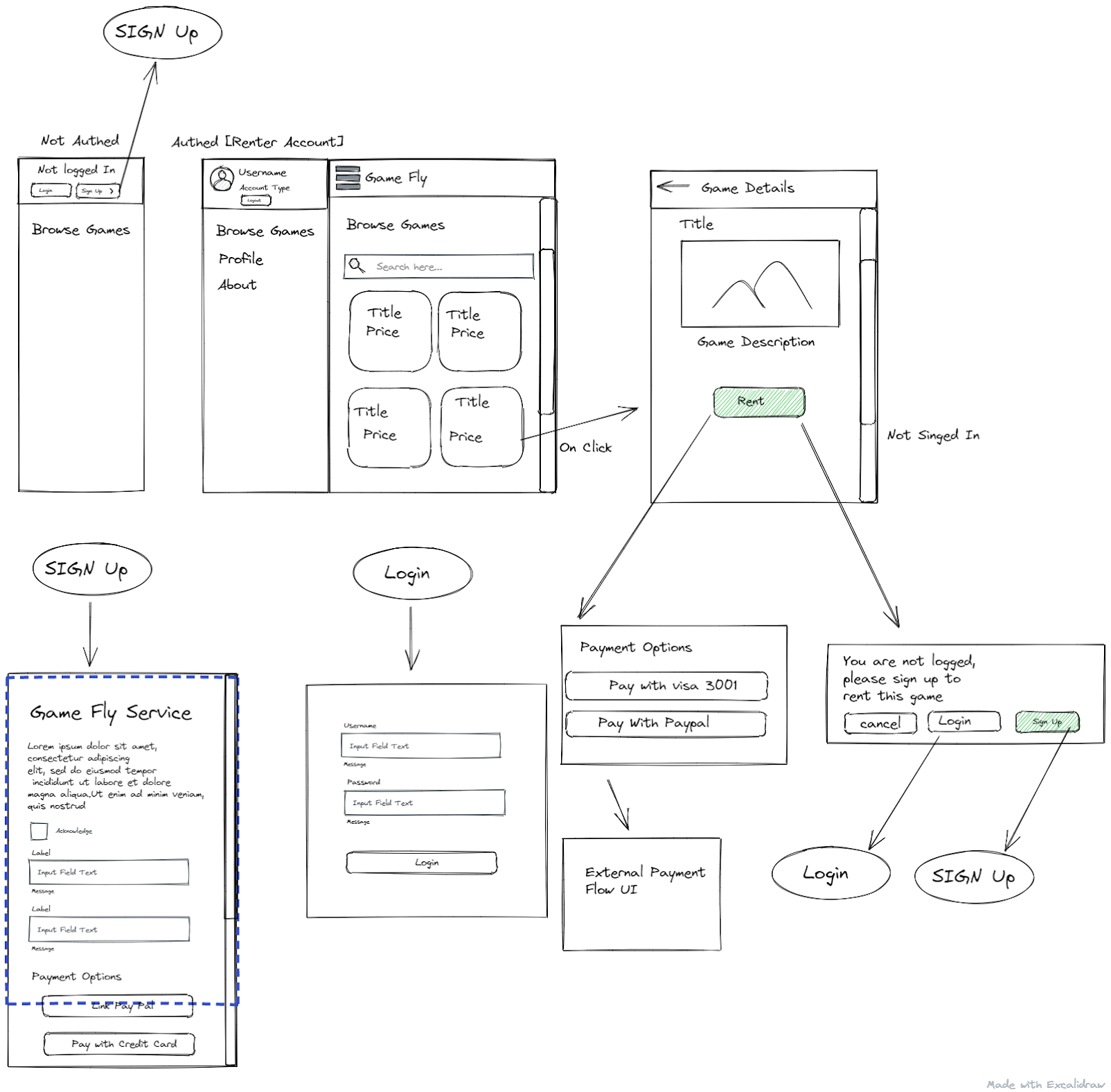
After the minimal viable product is decided on, wireframing is a good step to take next to visualize the product. The following UI design was done using excalidraw. Note only a low fidelity prototype is required. Wireframe diagrams only.
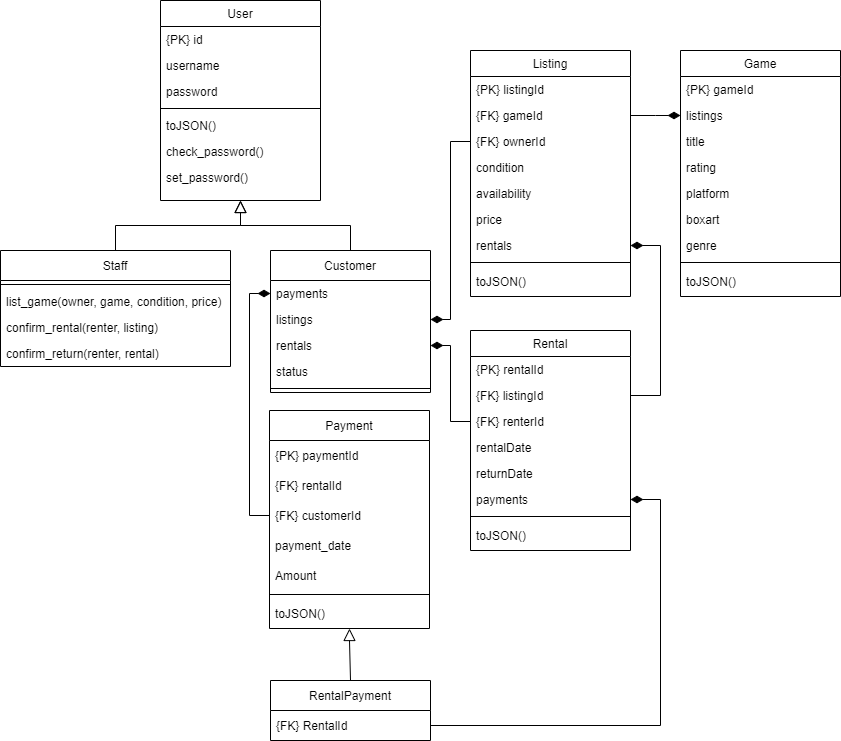
Next your model design should be created based on the requirements of the problem. It should encapsulate features, constraints and business rules of the application.
MVP Features
- User Account
- View Game Catalogue
- Renter - Submit games for rental
- Borrower - Borrow games
- Borrower- Return games
A listing is a copy of a game submitted to the pool, it has a customer owner and can be rented multiple times once returned between rentals. Owners can control the price of their listing.
This template follows the service repository pattern. The service repository pattern allows you to have a layered architecture where each layer has a clear responsibility. This separation improves testability, scalability, and maintainability.
Presentation Layer (Routers)
        ↓
Service Layer (Business Logic)
        ↓
Repository Layer (Data Access)
        ↓
Database
Presentation Layer (Routers)
This layer:
- Handles HTTP requests
- Performs basic validation
- Calls the service layer
- Returns responses or templates
Service Layer (Business Logic)
This is the core of your application logic and it handles
- coordination of workflows
- enforce business rules
- call repositories
Repository Layer (Data Access)
Repositories abstract the database and contain logic on how to
- perform queries
- persist data
Models
Models are the raw classes that become tables in the DB
After the models are planned, create the repositories. These will contain the usual CRUD functionality for the models
After your model and repository implementation starts, you can plan a minimal list of services to implement that will cover the main features of the application. At this time it is good to acknowledge any assumptions, business rules and constraints as they will directly affect how certain implementations are made.
Business Rules
- A rental that hasn't been returned past 2 weeks (14 days) after the due date is considered lost, the borrower should have its account status set to banned. The store shall repurchase the game and relist it.
- Late fee is calculated on 10% of listing price per day after 2 weeks
- Each rental is for a period of 2 weeks
Constraints
Considerations and limitations of the operating environment of the client that would directly impact the solution.
- Customers must come in physically to burrow, return, submit games
- The game pool is entirely dependent on customers willing to submit their games
- There's a risk of customers not returning the game, late returns or in a damaged condition
- Store does not have a database of every possible game that may be listed by a customer
- The store currently has no app or online presence
- The store has no facility to send or receive payments digitally
Assumptions/Feasibility
General technologically agnostic requirements that must be met for the solution to be feasible.
- Customers are willing to pay deposit and subscription for service
- Majority of customers would return games on time
- Customers are willing to list their games for rentals
- The game store can securely store the games
- The game store is a registered business and satisfies the requirements of becoming a merchant account on online payment platforms
Implementation
Finally the list of services are as follows
feature | service | description |
User Account | AuthService.authenticate_user(username, password) | Authenticates a user |
UserService.create_customer(username, password) | Creates a customer | |
UserService.create_staff(username, password) | Creates a staff member | |
Game Rental Catalogue | ListingService.get_avaiable_listings() | Gets all available game listings |
Borrow Game | RentalService.rent_game(userId, listingid) | Updates a given listing to unavailable and creates a rental for the given user |
Submit Games for rental | ListingService.list_game(userId, gameId, condition, price) | Creates a game listing by a given user |
Log Payment | PaymentService.create_rental_payment(userId, rentalId, amount) | Creates a payment for a specified rental and user |
Return Rental | RentalService.return_rental(rentalId) | Updates the return date of a given rental and updates the corresponding listing to available and create a rental payment including any late fees |
After models, repositories and services are planned you can then proceed to create a gitpod workspace from your repo to begin adding implementation, or you can work off your own device.
In general, most models will have a corresponding Repository where you define CRUD functionality
Services may make use of one or more repositories to complete a function.
Often teams may choose to split up work between services and view logic, thus it is ideal to be able to test a service without needing to wait on UI code.
Using cli commands is a great way to achieve this. Review the first few labs and check out the implementation of the cli.py files to see how commands can be created
After implementing your UI changes, you can push your changes to a branch and have your team members review it before merging it into the main branch
This concludes the lab, good luck in your projects!