This lab is a continuation from lab 5. In this lab we'd cover some more advanced topics such as
- Authenticating User Classes
- Pagination
- Advanced Querying
- Filtering
- Visualizations
You can get the starter code here
Don't forget to run
python -m venv venvvenv\Scripts\activateif you're on windows (the slashes are important) or
source venv/bin/activateif on Mac/Linuxpip install -e .python app/cli.py initializeto seed the databasefastapi devto run the application or
fastapi dev --port 9000if you're on the lab computer- Open this link if on your personal machine or this link if you're on the lab computer
The todo application was updated to work with multiple user classes. Admins can now login to perform actions with higher privileges.
In order to achieve this we would have to make a custom dependency to restrict routes to different types of users.
Task 2.1
Create a template file named admin.html with the following content.
{% extends "layout.html" %}
{% block title %}Admin View{% endblock %}
{% block page %}Admin View{% endblock %}

{% block link%}
    <ul id="nav-mobile" class="right">
        <li><a href="/stats">Stats</a></li>
        <li><a href="/logout">Logout</a></li>
    </ul>
{% endblock %}

{% block styles %}

{% endblock %}

{% block content %}
      <main class="container" style="padding-top:100px">


        <form  method="GET" action="/admin">
          <div class="row">
            <div class="col m10 input-field">
              <input class="blue-text"  name="q" type="search" placeholder="Search">
            </div>
            <div class="col m2 input-field">
              <div class="row">
                <button type="submit" class="btn blue">
                  <i class="material-icons">search</i>
                </button>
                <button type="button" onclick="q.value=''; this.form.submit()" class="btn blue">
                  <i class="material-icons">close</i>
                </button>
              </div>

            </div>
          </div>


        </form>

        <table>
          <thead>
            <tr>
                <th>ID</th>
                <th>User</th>
                <th>Text</th>
                <th>Done</th>
            </tr>
          </thead>

          <tbody>
            {% for todo in todos %}
            <tr>
              <td>{{todo.id}}</td>
              <td>{{todo.user.username}}</td>
              <td>{{todo.text}}</td>
              <td>{{todo.done}}</td>
            </tr>
            {% endfor %}

          </tbody>
        </table>


      </main>
{% endblock %}
Task 2.2
Create a new dependency that checks to see if the logged in user is an admin or not. This function should be added to auth.py under AuthDep
IsUserLoggedIn = Annotated[bool, Depends(is_logged_in)]
AuthDep = Annotated[User, Depends(get_current_user)]
# New code below


async def is_admin(user: User):
    return user.role == "admin"

async def is_admin_dep(user: AuthDep):
    if not await is_admin(user):
        raise HTTPException(
                status_code=status.HTTP_401_UNAUTHORIZED,
                detail="You are not authorized to access this page",
            )
    return user

AdminDep = Annotated[User, Depends(is_admin_dep)]
Task 2.3
Create a new router routers/admin.py and define a new route that can load that page
from fastapi import APIRouter, HTTPException, Depends, Request, Response, Form,  Query
from sqlmodel import select, func
from math import ceil
from app.database import SessionDep
from app.models import *
from app.auth import *
from fastapi.security import OAuth2PasswordRequestForm
from typing import Annotated
from fastapi import status
from fastapi.responses import HTMLResponse, RedirectResponse
from app.utilities import flash
from . import templates


admin_router = APIRouter(tags=["Admin App"])

@admin_router.get("/admin")
def admin_page(request:Request, db:SessionDep, user:AdminDep):
    todos = db.exec(select(Todo)).all()

    return templates.TemplateResponse(
        request=request,
        name="admin.html",
        context={
            "current_user": user,
            "todos": todos
        }
    )
Task 2.4
Include the newly created router in the routers/__init__.py file
from .admin import admin_router
main_router.include_router(admin_router)
Task 2.5
Update the home route in routers/home.py to redirect admins to the admin page
@home_router.get("/", response_class=HTMLResponse)
async def index(
    request: Request,
    user_logged_in: IsUserLoggedIn,
    db:SessionDep
):
    if user_logged_in:
        user = await get_current_user(request, db)
        if await is_admin(user):
            return RedirectResponse(url="/admin", status_code=status.HTTP_303_SEE_OTHER)
        return RedirectResponse(url="/app", status_code=status.HTTP_303_SEE_OTHER)
    return RedirectResponse(url="/login", status_code=status.HTTP_303_SEE_OTHER)
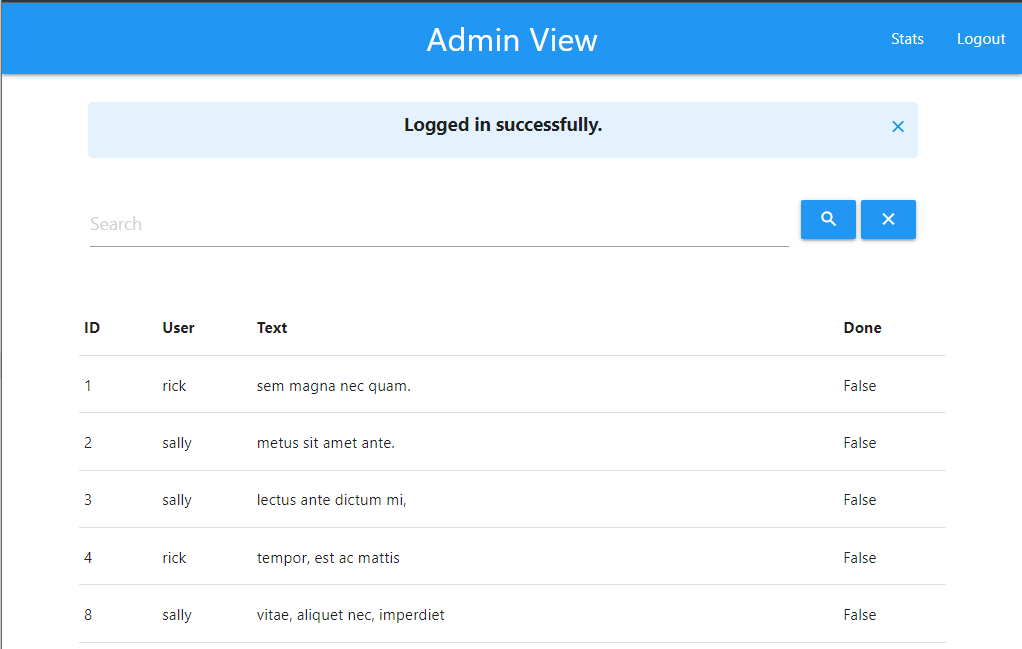
When we login with admin credentials pam, pampass we would now see the admin view.
Pagination is a common UI pattern that allows the user to browse a subset of results instead of the entire dataset, this helps with performance and UX.
We use limit() and offset() to paginate our results.
Task 3.1
Create a new file app/pagination.py with the following
from math import ceil

class Pagination:
    def __init__(self, total_count: int, current_page: int, limit: int):
        self.total_count = total_count
        self.limit = limit
        self.page = current_page
        self.total_pages = ceil(total_count / limit) if limit > 0 else 1

    @property
    def has_prev(self):
        return self.page > 1

    @property
    def prev_num(self):
        return self.page - 1

    @property
    def has_next(self):
        return self.page < self.total_pages

    @property
    def next_num(self):
        return self.page + 1

    def iter_pages(self, left_edge=2, left_current=2, right_current=3, right_edge=2):
        last = 0
        for num in range(1, self.total_pages + 1):
            if num <= left_edge or \
               (num > self.page - left_current - 1 and num < self.page + right_current) or \
               num > self.total_pages - right_edge:
                if last + 1 != num:
                    yield None
                yield num
                last = num
Task 3.2
Update the following admin_page route function as follows
# Add the following line to the imports
from app.pagination import Pagination

# Function below
@admin_router.get("/admin")
def admin_page(request:Request, db:SessionDep, user:AdminDep, page: int = Query(default=1, ge=1), limit: int = Query(default=100, le=100)):
    offset = (page - 1) * limit

    count_todos = db.exec(select(func.count(Todo.id))).one()
    todos = db.exec(select(Todo).offset(offset).limit(limit)).all()
    pagination = Pagination(total_count=count_todos, current_page=page, limit=limit)

    return templates.TemplateResponse(
        request=request,
        name="admin.html",
        context={
            "current_user": user,
            "todos": todos,
            "pagination": pagination,
        }
    )
Here we can see two new parameters to the function, i.e. page and limit
- page is defaulted to 1
- Limit is defaulted to 100 and has a constraint that if it's specified, the number can't exceed 100
count_todoscounts all items in the tabletodosis the list of objects returned from the querypaginationis an object that stores the metadata about the query and will be used for navigation controls
Task 3.3
Finally we update our template with some rather involved templating code to show the pagination controls. Add the following snippet under the table in admin.html
 <div class="row">
    <ul class="pagination">
      {% if pagination.has_prev %}
      <li class="waves-effect">
        <a href="{{ url_for('admin_page') }}?page={{ pagination.prev_num }}">
          <i class="material-icons">chevron_left</i>
        </a>
      </li>
      {% else %}
      <li class="disabled">
        <a href="#!"><i class="material-icons">chevron_left</i></a>
      </li>
      {% endif %}

      {% for page_num in pagination.iter_pages() %}
      {% if page_num %}
      {% if pagination.page == page_num %}
      <li class="active blue"><a href="#!">{{ page_num }}</a></li>
      {% else %}
      <li class="waves-effect">
        <a href="{{ url_for('admin_page') }}?page={{ page_num }}">{{ page_num }}</a>
      </li>
      {% endif %}
      {% else %}
      <li class="disabled"><a href="#!">...</a></li>
      {% endif %}
      {% endfor %}

      {% if pagination.has_next %}
      <li class="waves-effect">
        <a href="{{ url_for('admin_page') }}?page={{ pagination.next_num }}">
          <i class="material-icons">chevron_right</i>
        </a>
      </li>
      {% else %}
      <li class="disabled">
        <a href="#!"><i class="material-icons">chevron_right</i></a>
      </li>
      {% endif %}
    </ul>

  </div>
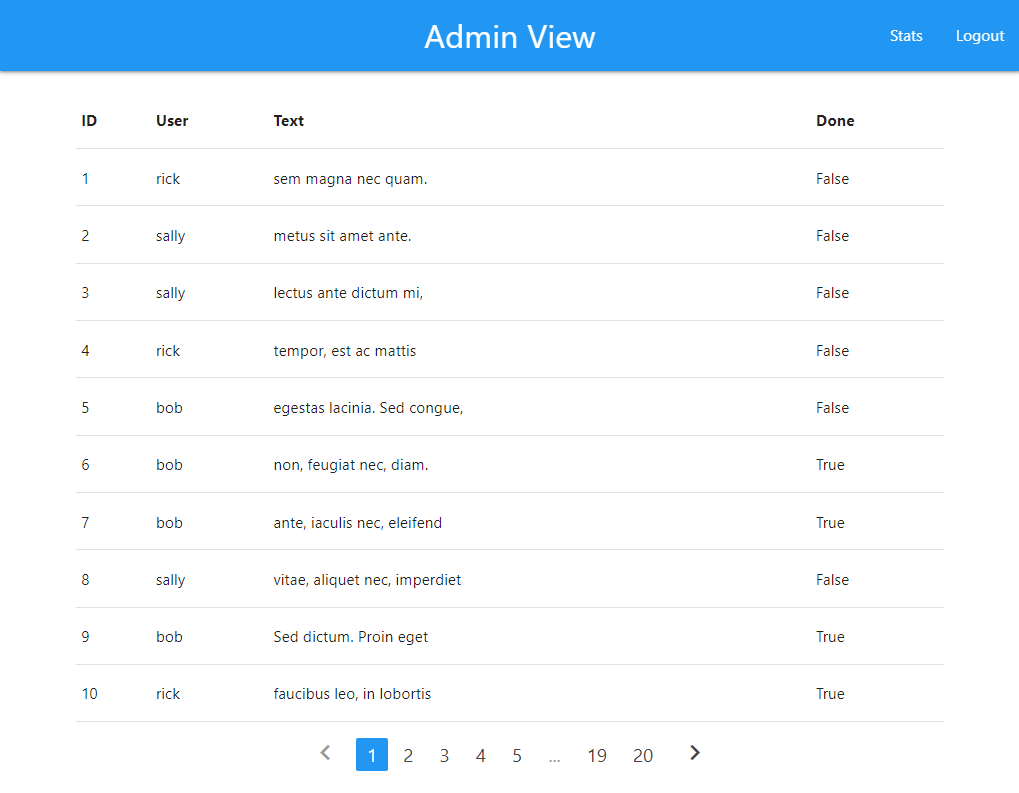
You should now have functional pagination controls
Task 3.4
Now let's modify the snippet of code to get the limit working
Replace the existing div class="row" element with the following
  <div class="row" style="display: flex; align-items: center; justify-content: center; position: relative;">

    <ul class="pagination" style="margin: 0;">
      {% if pagination.has_prev %}
      <li class="waves-effect">
        <a href="{{ url_for('admin_page') }}?page={{ pagination.prev_num }}">
          <i class="material-icons">chevron_left</i>
        </a>
      </li>
      {% else %}
      <li class="disabled">
        <a href="#!"><i class="material-icons">chevron_left</i></a>
      </li>
      {% endif %}

      {% for page_num in pagination.iter_pages() %}
      {% if page_num %}
      {% if pagination.page == page_num %}
      <li class="active blue"><a href="#!">{{ page_num }}</a></li>
      {% else %}
      <li class="waves-effect">
        <a href="{{ url_for('admin_page') }}?page={{ page_num }}">{{ page_num }}</a>
      </li>
      {% endif %}
      {% else %}
      <li class="disabled"><a href="#!">...</a></li>
      {% endif %}
      {% endfor %}

      {% if pagination.has_next %}
      <li class="waves-effect">
        <a href="{{ url_for('admin_page') }}?page={{ pagination.next_num }}">
          <i class="material-icons">chevron_right</i>
        </a>
      </li>
      {% else %}
      <li class="disabled">
        <a href="#!"><i class="material-icons">chevron_right</i></a>
      </li>
      {% endif %}
    </ul>

    <div class="input-field" style="position: absolute; right: 25px; margin: 0; ">
      <select id="limit-select" onchange="location = this.value;">
        {% for n in [10, 25, 50, 100] %}
        <option value="{{ url_for('admin_page') }}?page=1&limit={{ n }}" {% if pagination.limit==n %}selected{% endif
          %}>
          {{ n }} rows
        </option>
        {% endfor %}
      </select>
    </div>
  </div>
At this point changing the dropdown from 100 to 10 updates the view accordingly. However, moving from one page to the next breaks this since the page parameter isn't sent in the url.
Fix this.
Task 3.5
Update the code to also include the limit parameter in the links by appending &limit={{ pagination.limit}} where necessary
Ensure that navigating with the numbers and chevrons work.
Next we shall implement the functionality of the search bar. Search bars typically let you search across various fields on a dataset For our case, we should be able to search for items by text, id or username
Task 4.1
Update the admin_home function as follows
@admin_router.get("/admin")
def admin_page(request:Request, db:SessionDep, user:AdminDep, page: int = Query(default=1, ge=1), limit: int = Query(default=100, le=100), q: str = Query(default='')):
    offset = (page - 1) * limit

    count_todos = db.exec(select(func.count(Todo.id))).one()
    if q:
        todos = db.exec(select(Todo).join(User).where(Todo.text.ilike(f"%{q}%") | User.username.ilike(f"%{q}%")).offset(offset).limit(limit)).all()
    else:
        todos = db.exec(select(Todo).offset(offset).limit(limit)).all()
    pagination = Pagination(total_count=count_todos, current_page=page, limit=limit)

    return templates.TemplateResponse(
        request=request,
        name="admin.html",
        context={
            "current_user": user,
            "todos": todos,
            "pagination": pagination,
            "q":q
        }
    )
Note that
- We have a new parameter
qwhich is the user's search query - The query performed when we have a search looks at both the
TodoandUsertables. This query does an inner join to get the results. - Adding in this functionality breaks the pagination as the search term isn't carried across in navigation
Complete the following 2 exercises before proceding to section 5
Task 4.2 (Exercise)
Update the admin.html and ensure the query shows in the search bar
Task 4.3 (Exercise)
Update the admin.html and ensure the query persists between navigation to other pages
You may realize that with these exercises, the count of the todos would be wrong since it's counting how many exist in the entire table. You can use the following function to help get the accurate count based on the query
@admin_router.get("/admin")
def admin_page(request:Request, db:SessionDep, user:AdminDep, page: int = Query(default=1, ge=1), limit: int = Query(default=100, le=100), q: str = Query(default='')):
    offset = (page - 1) * limit

    db_qry = select(Todo).join(User)
    if q:
        db_qry = db_qry.where(
            Todo.text.ilike(f"%{q}%") | User.username.ilike(f"%{q}%")
        )
    count_qry = select(func.count()).select_from(db_qry.subquery())
    count_todos = db.exec(count_qry).one()

    todos = db.exec(db_qry.offset(offset).limit(limit)).all()
    pagination = Pagination(total_count=count_todos, current_page=page, limit=limit)

    return templates.TemplateResponse(
        request=request,
        name="admin.html",
        context={
            "current_user": user,
            "todos": todos,
            "pagination": pagination,
            "q":q
        }
    )
Next we want to add some filter controls to filter out done, or not done todos.
If you did not get through with the previous exercises, use this admin.html to continue
{% extends "layout.html" %}
{% block title %}Admin View{% endblock %}
{% block page %}Admin View{% endblock %}

{% block link%}
<ul id="nav-mobile" class="right">
  <li><a href="/todo-stats">Stats</a></li>
  <li><a href="/logout">Logout</a></li>
</ul>
{% endblock %}

{% block styles %}

{% endblock %}

{% block content %}
<main class="container" style="padding-top:100px">


  <form method="GET" action="/admin">
    <div class="row">
      <div class="col m10 input-field">
        <input class="blue-text" name="q" type="search" placeholder="Search" value="{{q}}">
      </div>
      <div class="col m2 input-field">
        <div class="row">
          <button type="submit" class="btn blue">
            <i class="material-icons">search</i>
          </button>
          <button type="button" onclick="q.value=''; this.form.submit()" class="btn blue">
            <i class="material-icons">close</i>
          </button>
        </div>

      </div>
    </div>
  </form>

  <table>
    <thead>
      <tr>
        <th>ID</th>
        <th>User</th>
        <th>Text</th>
        <th>Done</th>
      </tr>
    </thead>

    <tbody>
      {% for todo in todos %}
      <tr>
        <td>{{todo.id}}</td>
        <td>{{todo.user.username}}</td>
        <td>{{todo.text}}</td>
        <td>{{todo.done}}</td>
      </tr>
      {% endfor %}

    </tbody>
  </table>

  <div class="row" style="display: flex; align-items: center; justify-content: center; position: relative;">

    <ul class="pagination" style="margin: 0;">
      {% if pagination.has_prev %}
      <li class="waves-effect">
        <a href="{{ url_for('admin_page') }}?page={{ pagination.prev_num }}&limit={{ pagination.limit}}&q={{ q }}">
          <i class="material-icons">chevron_left</i>
        </a>
      </li>
      {% else %}
      <li class="disabled">
        <a href="#!"><i class="material-icons">chevron_left</i></a>
      </li>
      {% endif %}

      {% for page_num in pagination.iter_pages() %}
      {% if page_num %}
      {% if pagination.page == page_num %}
      <li class="active blue"><a href="#!">{{ page_num }}</a></li>
      {% else %}
      <li class="waves-effect">
        <a href="{{ url_for('admin_page') }}?page={{ page_num }}&limit={{ pagination.limit }}&q={{ q }}">{{ page_num }}</a>
      </li>
      {% endif %}
      {% else %}
      <li class="disabled"><a href="#!">...</a></li>
      {% endif %}
      {% endfor %}

      {% if pagination.has_next %}
      <li class="waves-effect">
        <a href="{{ url_for('admin_page') }}?page={{ pagination.next_num }}&limit={{ pagination.limit }}&q={{ q }}">
          <i class="material-icons">chevron_right</i>
        </a>
      </li>
      {% else %}
      <li class="disabled">
        <a href="#!"><i class="material-icons">chevron_right</i></a>
      </li>
      {% endif %}
    </ul>

    <div class="input-field" style="position: absolute; right: 25px; margin: 0; ">
      <select id="limit-select" onchange="location = this.value;">
        {% for n in [10, 25, 50, 100] %}
        <option value="{{ url_for('admin_page') }}?page=1&limit={{ n }}&q={{ q }}" {% if pagination.limit==n %}selected{% endif
          %}>
          {{ n }} rows
        </option>
        {% endfor %}
      </select>
    </div>
  </div>

</main>
{% endblock %}
Task 5.1
Update the admin_page function to take a done parameter which can be "true", "false" or "any" and filter the result based on the value.
@admin_router.get("/admin")
def admin_page(request:Request, db:SessionDep, user:AdminDep, page: int = Query(default=1, ge=1), limit: int = Query(default=100, le=100), q: str = Query(default=''), done:str =  Query(default="any")):
    offset = (page - 1) * limit

    db_qry = select(Todo).join(User)
    if q:
        db_qry = db_qry.where(
            Todo.text.ilike(f"%{q}%") | User.username.ilike(f"%{q}%")
        )
    if done == "true": #note the string here
        db_qry = db_qry.where(
            Todo.done == True
        )
    elif done == "false":
        db_qry = db_qry.where(
            Todo.done == False
        )
    # Note that we on'y really care if "done" is true/false, anything else we ignore
    count_qry = select(func.count()).select_from(db_qry.subquery())
    count_todos = db.exec(count_qry).one()

    todos = db.exec(db_qry.offset(offset).limit(limit)).all()
    pagination = Pagination(total_count=count_todos, current_page=page, limit=limit)

    return templates.TemplateResponse(
        request=request,
        name="admin.html",
        context={
            "current_user": user,
            "todos": todos,
            "pagination": pagination,
            "q":q,
            "done": done
        }
    )
Task 5.2
Add the following code within the form element at the top with the search bar in admin.html to provide filtering controls for the user.
          <div class="row">
             <label>
              <input class="with-gap blue" name="done" type="radio" value="true" onchange="this.form.submit()" {{ "checked" if done=="true" }} />
              <span>Done</span>
            </label>
            <label>
              <input class="with-gap blue" name="done" type="radio" value="false" onchange="this.form.submit()" {{ "checked" if done=="false" }} />
              <span>Not Done</span>
            </label>
            <label>
              <input class="with-gap blue" name="done" type="radio" value="any" onchange="this.form.submit()" {{ "checked" if done=="any" }} />
              <span>Any</span>
            </label>
          </div>
The radio buttons will be filled based on the value of the done query parameter.
Additionally, ensure navigation with the chevrons show the proper data.
Next we want to add a visualization to our application. We can add a highcharts pie chart to our page.
If you look in stats.html you should find code derived from this highcharts example for rendering a pie chart based on data in the database.
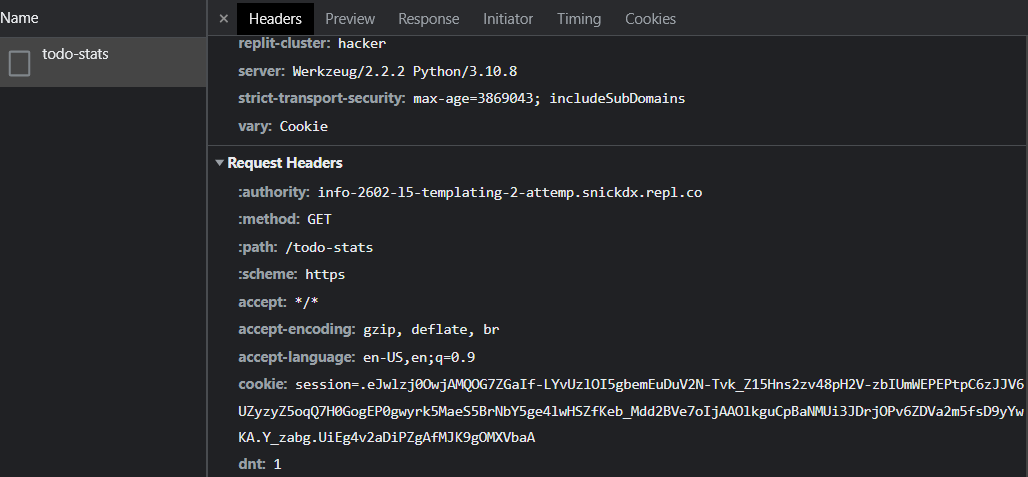
Note the use of JavaScript to fetch data from a route ‘todo-stats", convert it into a relevant format for highcharts then call highcharts to render the chart on the page.
Tasks 6.1
Create a stats.html template with the following
 {% extends "layout.html" %}
{% block title %}Stats View{% endblock %}
{% block page %}Stats View{% endblock %}

{% block link%}
    <ul id="nav-mobile" class="right">
        <li><a href="/admin">Admin</a></li>
        <li><a href="/logout">Logout</a></li>
    </ul>
{% endblock %}

{% block styles %}
  .highcharts-figure,
  .highcharts-data-table table {
    min-width: 320px;
    max-width: 660px;
    margin: 1em auto;
  }

  .highcharts-data-table table {
    font-family: Verdana, sans-serif;
    border-collapse: collapse;
    border: 1px solid #ebebeb;
    margin: 10px auto;
    text-align: center;
    width: 100%;
    max-width: 500px;
  }

  .highcharts-data-table caption {
    padding: 1em 0;
    font-size: 1.2em;
    color: #555;
  }

  .highcharts-data-table th {
    font-weight: 600;
    padding: 0.5em;
  }

  .highcharts-data-table td,
  .highcharts-data-table th,
  .highcharts-data-table caption {
    padding: 0.5em;
  }

  .highcharts-data-table thead tr,
  .highcharts-data-table tr:nth-child(even) {
    background: #f8f8f8;
  }

  .highcharts-data-table tr:hover {
    background: #f1f7ff;
  }
{% endblock %}

{% block content %}
<script src="https://code.highcharts.com/highcharts.js"></script>
<script src="https://code.highcharts.com/modules/exporting.js"></script>
<script src="https://code.highcharts.com/modules/export-data.js"></script>
<script src="https://code.highcharts.com/modules/accessibility.js"></script>

<main class="container" style="padding-top:100px">
  <secion class="col m12">
    <figure class="highcharts-figure">
      <div id="container"></div>
    </figure>
  </secion>
</main>
<script>

  function drawChart(data){
    Highcharts.chart('container', {
      chart: {
        plotBackgroundColor: null,
        plotBorderWidth: null,
        plotShadow: false,
        type: 'pie'
      },
      title: {
        text: 'Todo share by User',
        align: 'left'
      },
      tooltip: {
        pointFormat: '{series.name}: <b>{point.percentage:.1f}%</b>'
      },
      accessibility: {
        point: {
          valueSuffix: '%'
        }
      },
      plotOptions: {
        pie: {
          allowPointSelect: true,
          cursor: 'pointer',
          dataLabels: {
            enabled: false
          },
          showInLegend: true
        }
      },
      series: [{
        name: 'Users',
        colorByPoint: true,
        data
      }]
    });
  }

  function convertData(data){
    res = []
    for(user in data){
      res.push({
        name:user,
        y: data[user]
      });
    }

    return res;
  }

  async function getData(){
    let res = await fetch('/todo-stats');
    let data = await res.json();
    data = convertData(data);
    drawChart(data);

  }

  getData();

</script>
{% endblock %}
Task 6.2
Create a new file routers/stats.py with the following
from fastapi import APIRouter, HTTPException, Depends, Request
from fastapi.responses import HTMLResponse, RedirectResponse
from sqlmodel import select
from app.database import SessionDep
from app.models import *
from app.auth import *
from fastapi.security import OAuth2PasswordRequestForm
from typing import Annotated
from fastapi import status
from . import templates

stats_router = APIRouter()

@stats_router.get("/stats", response_class=HTMLResponse)
async def stats_page(
    request: Request,
    user: AdminDep
):
    return templates.TemplateResponse(
        request=request,
        name="stats.html",
        context={
            "request": request,
            "current_user": user
        }
    )
Task 6.3
Include the following in the routers/__init__.py
from .stats import stats_router
main_router.include_router(stats_router)
Task 6.4
Add the API endpoint
@stats_router.get("/todo-stats")
async def stats_page(
    request: Request,
    user: AdminDep,
    db: SessionDep
):
    todos = db.exec(select(Todo)).all()
    res = {}
    for todo in todos:
        if todo.user.username in res:
            res[todo.user.username] += 1
        else:
            res[todo.user.username] = 1
    return res
That's the end of the lab. You've just built an entire CRUD application without writing any javascript. This is possible because we shifted all of our view logic to the server side.