In this lab we shall return to building application server routes. In order to test them we will need to use postman
Task 1.1
Just like in the previous labs, fork this link to create a copy of the project on your own GitHub account, then, clone it. Open the appropriate folder in VSCode and run the following commands.
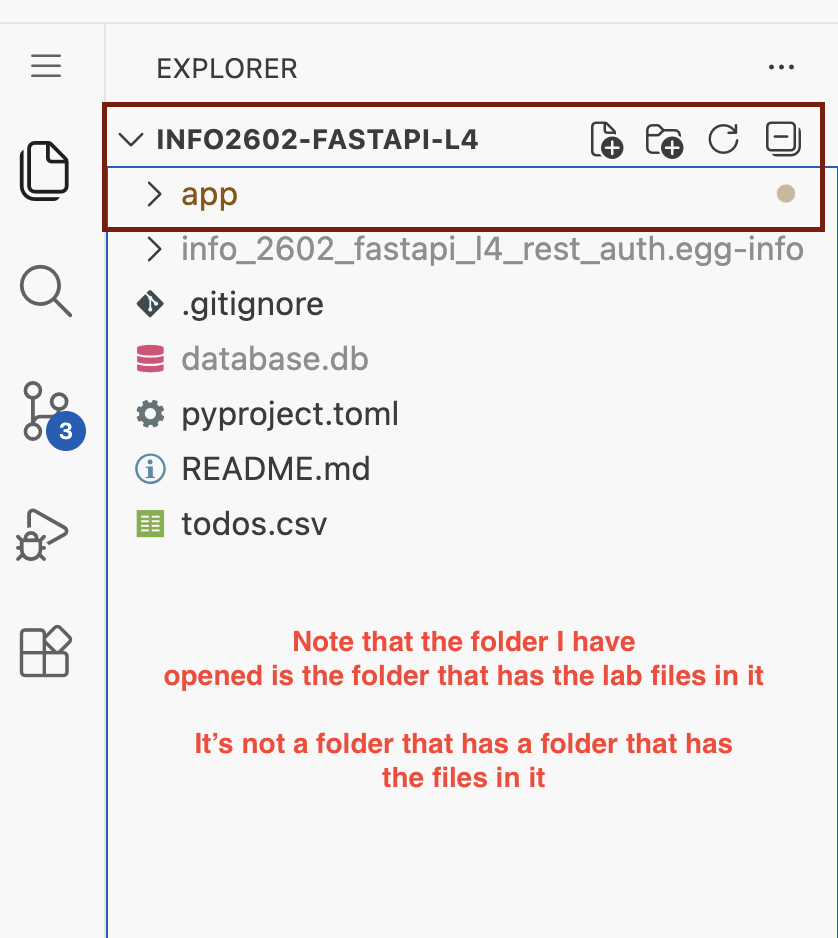
Ensure the folder you open is the one that has the python files and app folder.
python -m venv venvvenv\Scripts\activateif you're on windows or
source venv/bin/activateif on Mac/Linuxpip install -e .
If you get any errors on step 3. It's likely you have the wrong folder open in VSCode. Open the correct folder and try again from step 1. The file panel in VSCode should look like this
We want to expand our todo application to cater for multiple user groups. Sometimes applications have different user classes that are authorized to perform different actions. This lab continues from last week's except the following user classes have been made.
Regular User: Previously the user model, can create edit delete their own todos
Admin User: Can access all todos in the application.
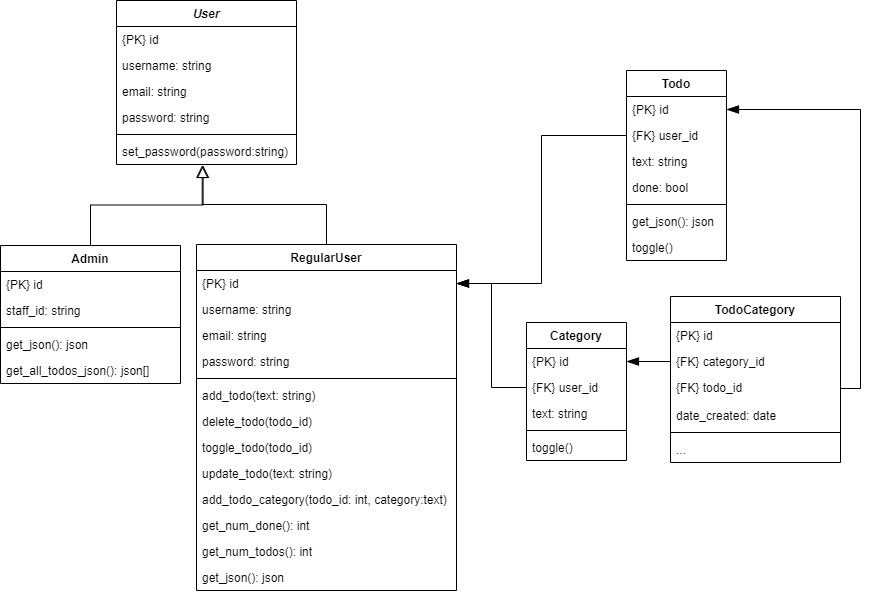
SQLModel allows us to use inheritance. The code in the lab shows multiple table inheritance where we have two tables (Admin and RegularUser) inheriting a base set of fields from User. The disadvantage of multiple table inheritance is that extra coding needs to be done to ensure usernames / emails are globally unique.
The workspace has been updated with the relevant changes for RegularUser.
Task 2.1
Initialize the database with the command python app/cli.py initialize

Task 2.2
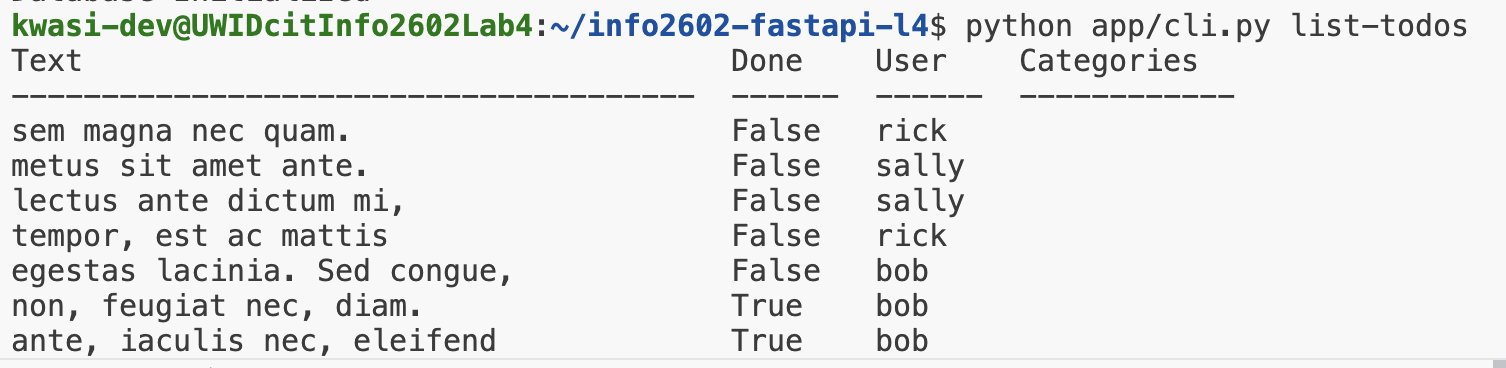
Run the command list-todos to list all the todos in the app
In many applications it is typical to restrict access to features from unauthorized parties. If your application deals with user data then users should be able to only manipulate the data that belong to them. This is achieved by applying the following concepts
- Authorization Is validating that the user is who they claim to be.
- Authentication Controlling what a particular user class can access.
In this lab we shall demonstrate token based authentication where users must login to receive a token that is used in every subsequent request to restricted resources.
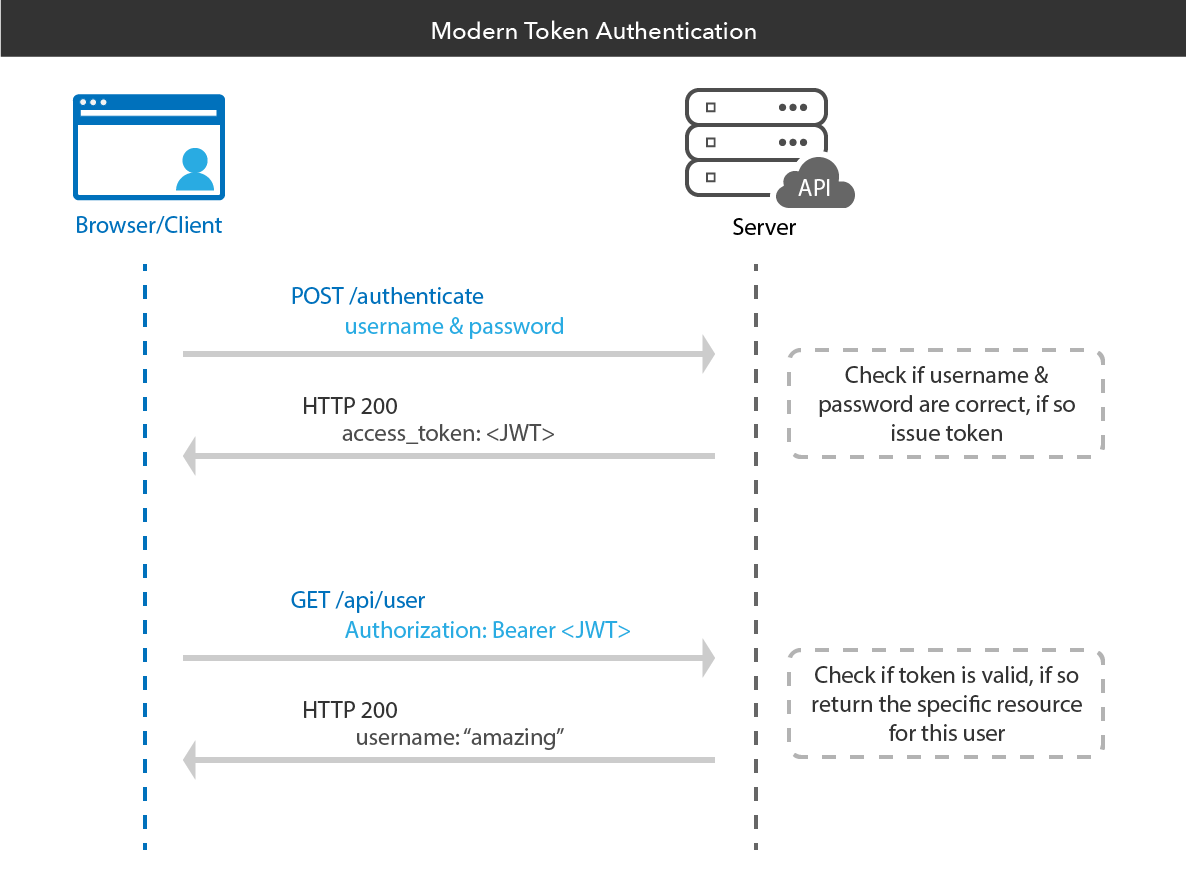
FastAPI has a built in security module that allows us to implement JWT token authentication.
Task 3.1
Create a new router routers/auth.py and implement a login function that would log in a user once their credentials are valid.
from fastapi import APIRouter, HTTPException, Depends
from sqlmodel import select
from app.database import SessionDep
from app.models import *
from app.auth import encrypt_password, verify_password, create_access_token, AuthDep
from fastapi.security import OAuth2PasswordRequestForm
from typing import Annotated
from fastapi import status

auth_router = APIRouter(tags=["Authentication"])

@auth_router.post("/token")
async def login_for_access_token(
    form_data: Annotated[OAuth2PasswordRequestForm, Depends()],
    db: SessionDep
) -> Token:
    user = db.exec(select(RegularUser).where(RegularUser.username == form_data.username)).one_or_none()
    if not user or not verify_password(plaintext_password=form_data.password, encrypted_password=user.password):
        raise HTTPException(
            status_code=status.HTTP_401_UNAUTHORIZED,
            detail="Incorrect username or password",
            headers={"WWW-Authenticate": "Bearer"},
        )

    access_token = create_access_token(data={"sub": f"{user.id}", "role": user.role},)

    return Token(access_token=access_token, token_type="bearer")
The details of the token generation can be found in app/auth.py in the create_access_token() function
If the username given exists and the user password matches then a token is generated based on the username else None is returned.
Add the following to the routers/__init__.py file.
from .auth import auth_router
main_router.include_router(auth_router)
You can view the endpoint at http://localhost:8000/docs for the docs
Task 3.2
Add the following to routers/auth.py
@auth_router.get("/identify", response_model=UserResponse)
def get_user_by_id(db: SessionDep, user:AuthDep):
    return user
We just added routes to login our pre-existing users but applications need a way to create users by registering/signing up.
Task 4.1
Add a new Data Model that would be used to register a user in models.py
class UserCreate(SQLModel):
    username:str
    email: EmailStr = Field(max_length=255)
    password: str = Field(min_length=8, max_length=128)
Task 4.2
Create a new endpoint to register a user (RegularUser) in the routers/auth.py
@auth_router.post('/signup', response_model=UserResponse, status_code=status.HTTP_201_CREATED)
def signup_user(user_data: UserCreate, db:SessionDep):
  try:
    new_user = RegularUser(
        username=user_data.username,
        email=user_data.email,
        password=encrypt_password(user_data.password)
    )
    db.add(new_user)
    db.commit()
    return new_user
  except Exception:
    db.rollback()
    raise HTTPException(
                status_code=400,
                detail="Username or email already exists",
                headers={"WWW-Authenticate": "Bearer"},
            )
RESTful APIs
RESTful is an architectural style for building out the urls of an application server. It specifies which HTTP methods should be used according to a desired CRUD operation.
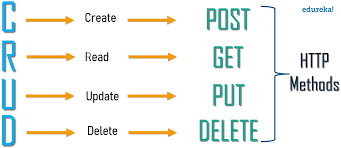
In this lab we shall implement the following API Specification. Feel free to create as many files with routers as you see fit
Route Name (AuthorizedUser Class) | Route | HTTP method | Description |
Sign Up | /signup | POST | Creates a user and returns a 201 status code if successful or 400 otherwise |
Login | /token | POST | Logs in user, returns a token if credentials are correct |
Identify | /identify | POST | Gets the profile information of the CURRENT LOGGED IN user |
Get Todos (Regular User) | GET | /todos | Returns all of the CURRENT LOGGED IN user's todos |
Get Todo (Regular User) | GET | /todo/{id} | Retrieves a todo if the user is authorized to access it |
Create Todo (Regular User) | POST | /todos | Creates a Todo if the user is authorized |
Update Todo (Regular User) | PUT | /todo/{id} | Updates the text of a Todo or its done state if the user is authorized to access it |
Delete Todo (Regular User) | DELETE | /todo/{id} | Deletes a Todo if the user is authorized to access it |
The following Data Models may prove to be useful
class TodoCreate(SQLModel):
    text:str

class TodoResponse(SQLModel):
    id: Optional[int] = Field(primary_key=True, default=None)
    text:str
    done: bool = False

class TodoUpdate(SQLModel):
    text: Optional[str] = None
    done: Optional[bool] = None
Solution
File routers/__init__.py
from fastapi import APIRouter
main_router = APIRouter()

from .auth import auth_router
main_router.include_router(auth_router)

from .todo import todo_router
main_router.include_router(todo_router)
File routers/auth.py
from fastapi import APIRouter, HTTPException, Depends
from sqlmodel import select
from app.database import SessionDep
from app.models import *
from app.auth import encrypt_password, verify_password, create_access_token, AuthDep
from fastapi.security import OAuth2PasswordRequestForm
from typing import Annotated
from fastapi import status

auth_router = APIRouter(tags=["Authentication"])

@auth_router.post("/token")
async def login_for_access_token(
    form_data: Annotated[OAuth2PasswordRequestForm, Depends()],
    db: SessionDep
) -> Token:
    # Try logging in a Regular User
    user = db.exec(select(RegularUser).where(RegularUser.username == form_data.username)).one_or_none()
    if not user or not verify_password(plaintext_password=form_data.password, encrypted_password=user.password):
        #Try logging in an admin
        user = db.exec(select(Admin).where(Admin.username == form_data.username)).one_or_none()
        if not user or not verify_password(plaintext_password=form_data.password, encrypted_password=user.password):
            raise HTTPException(
                status_code=status.HTTP_401_UNAUTHORIZED,
                detail="Incorrect username or password",
                headers={"WWW-Authenticate": "Bearer"},
            )

    access_token = create_access_token(data={"sub": user.id, "role": user.role},)

    return Token(access_token=access_token, token_type="bearer")

@auth_router.get("/identify", response_model=UserResponse)
def get_user_by_id(db: SessionDep, user:AuthDep):
    return user


@auth_router.post('/signup', response_model=UserResponse, status_code=status.HTTP_201_CREATED)
def signup_user(user_data: UserCreate, db:SessionDep):
  try:
    new_user = RegularUser(
        username=user_data.username,
        email=user_data.email,
        password=encrypt_password(user_data.password)
    )
    db.add(new_user)
    db.commit()
    return new_user
  except Exception:
    db.rollback()
    raise HTTPException(
                status_code=400,
                detail="Username or email already exists",
                headers={"WWW-Authenticate": "Bearer"},
            )
File routers/todo.py
from fastapi import APIRouter, HTTPException, Depends
from sqlmodel import select
from app.database import SessionDep
from app.models import *
from app.auth import encrypt_password, verify_password, create_access_token, AuthDep
from fastapi.security import OAuth2PasswordRequestForm
from typing import Annotated
from fastapi import status

todo_router = APIRouter(tags=["Todo Management"])


@todo_router.get('/todos', response_model=list[TodoResponse])
def get_todos(db:SessionDep, user:AuthDep):
    return user.todos

@todo_router.get('/todo/{id}', response_model=TodoResponse)
def get_todo_by_id(id:int, db:SessionDep, user:AuthDep):
    todo = db.exec(select(Todo).where(Todo.id==id, Todo.user_id==user.id)).one_or_none()
    if not todo:
        raise HTTPException(
            status_code=status.HTTP_401_UNAUTHORIZED,
            detail="Unauthorized",
            headers={"WWW-Authenticate": "Bearer"},
        )
    return todo

@todo_router.post('/todos', response_model=TodoResponse)
def create_todo(db:SessionDep, user:AuthDep, todo_data:TodoCreate):
    todo = Todo(text=todo_data.text, user_id=user.id)
    try:
        db.add(todo)
        db.commit()
        db.refresh(todo)
        return todo
    except Exception:
        raise HTTPException(
            status_code=status.HTTP_503_SERVICE_UNAVAILABLE,
            detail="An error occurred while creating an item",
        )

@todo_router.put('/todo/{id}', response_model=TodoResponse)
def update_todo(id:int, db:SessionDep, user:AuthDep, todo_data:TodoUpdate):
    todo = db.exec(select(Todo).where(Todo.id==id, Todo.user_id==user.id)).one_or_none()
    if not todo:
        raise HTTPException(
            status_code=status.HTTP_401_UNAUTHORIZED,
            detail="Unauthorized",
        )
    if todo_data.text:
        todo.text = todo_data.text
    if todo_data.done:
        todo.done = todo_data.done
    try:
        db.add(todo)
        db.commit()
        return todo
    except Exception:
        raise HTTPException(
            status_code=status.HTTP_503_SERVICE_UNAVAILABLE,
            detail="An error occurred while updating an item",
        )

@todo_router.delete('/todo/{id}', status_code=status.HTTP_200_OK)
def update_todo(id:int, db:SessionDep, user:AuthDep):

    todo = db.exec(select(Todo).where(Todo.id==id, Todo.user_id==user.id)).one_or_none()
    if not todo:
        raise HTTPException(
            status_code=status.HTTP_401_UNAUTHORIZED,
            detail="Unauthorized",
        )
    try:
        db.delete(todo)
        db.commit()
    except Exception:
        raise HTTPException(
            status_code=status.HTTP_503_SERVICE_UNAVAILABLE,
            detail="An error occurred while deleting an item",
        )
File models.py
from sqlmodel import Field, SQLModel, Relationship
from typing import Optional
from pydantic import EmailStr   #insert at top of the file

class Token(SQLModel):
    access_token: str
    token_type: str

class UserCreate(SQLModel):
    username:str
    email: EmailStr = Field(max_length=255)
    password: str = Field(min_length=8, max_length=128)

class UserResponse(SQLModel):
    id: Optional[int]
    username:str
    email: EmailStr

class User(SQLModel, table=False):
    id: Optional[int] = Field(default=None, primary_key=True)
    username: str = Field(index=True, unique=True)
    email: str = Field(index=True, unique=True)
    password: str
    role:str = ""

class Admin(User, table=True):
    role:str = "admin"

class RegularUser(User, table=True):
    role:str = "regular_user"

    todos: list['Todo'] = Relationship(back_populates="user")

class TodoCategory(SQLModel, table=True):
    category_id: int = Field(foreign_key="category.id", primary_key=True)
    todo_id: int = Field(foreign_key="todo.id", primary_key=True)

class Category(SQLModel, table=True):
    id: Optional[int] = Field(primary_key=True, default=None)
    user_id: int = Field(foreign_key="regularuser.id")
    text:str

    todos:list['Todo'] = Relationship(back_populates="categories", link_model=TodoCategory)

class TodoCreate(SQLModel):
    text:str

class TodoResponse(SQLModel):
    id: Optional[int] = Field(primary_key=True, default=None)
    text:str
    done: bool = False

class TodoUpdate(SQLModel):
    text: Optional[str] = None
    done: Optional[bool] = None

class Todo(SQLModel, table=True):
    id: Optional[int] = Field(primary_key=True, default=None)
    user_id: int = Field(foreign_key="regularuser.id")
    text:str
    done: bool = False

    user: RegularUser = Relationship(back_populates="todos")
    categories:list['Category'] = Relationship(back_populates="todos", link_model=TodoCategory)

    def toggle(self):
        self.done = not self.done

    def get_cat_list(self):
        return ', '.join([category.text for category in self.categories])
Using the docs site may be a bit troublesome. An alternative client you can use is Postman. If you're on your personal device, download and install postman. If you're on the lab computer, it should be installed
Create an account and sign in.
Once you're signed in complete the tasks below
Task 6.1 - Import the documentation
Open this lab's documentation endpoint http://localhost:8000/docs
Save the spec file
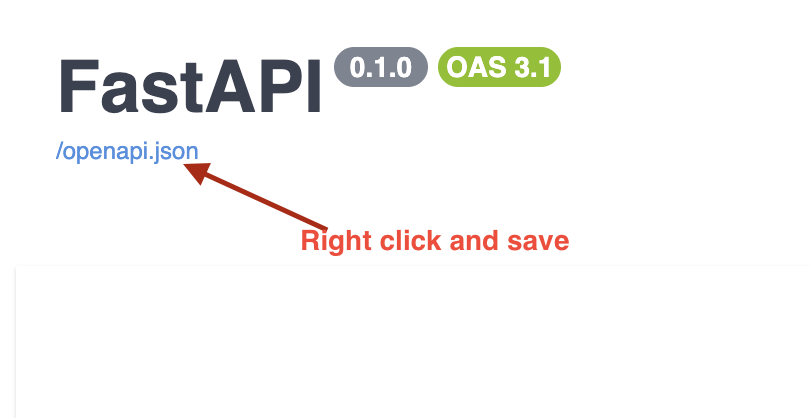
Drag and drop the file into postman to import it
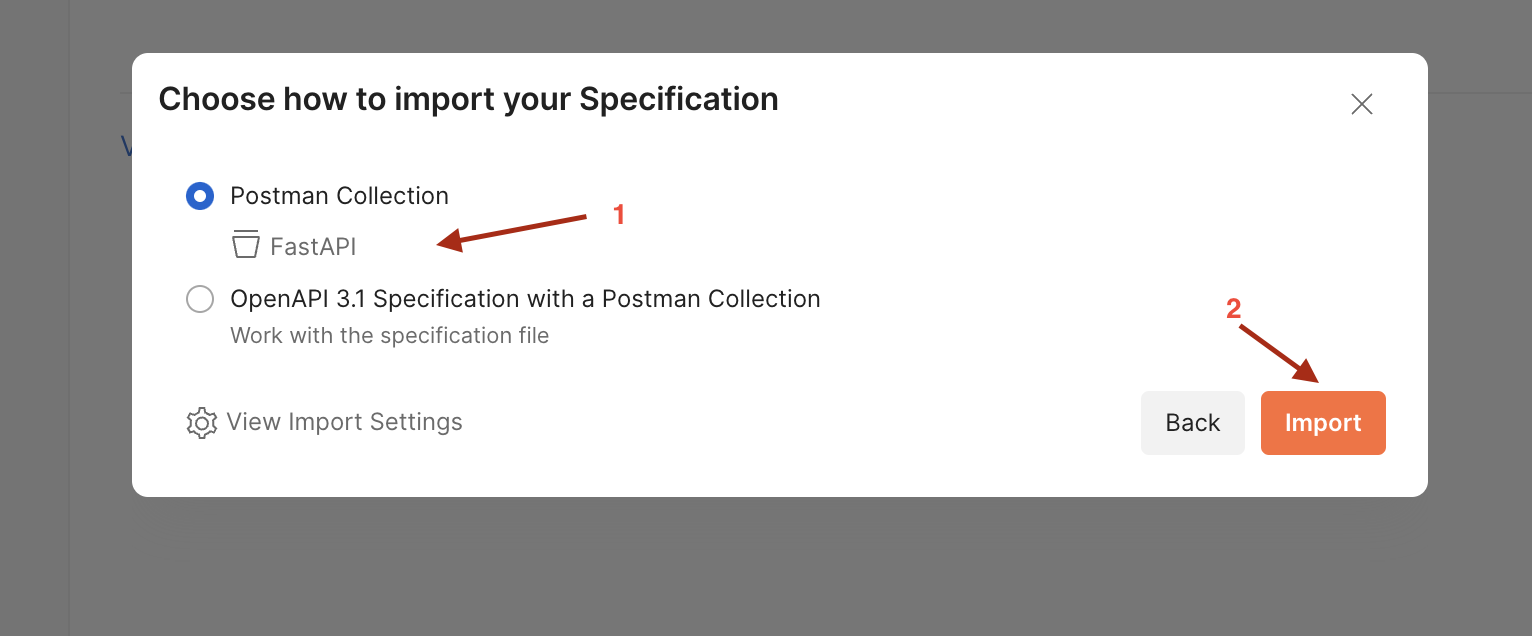
Next, edit the environment
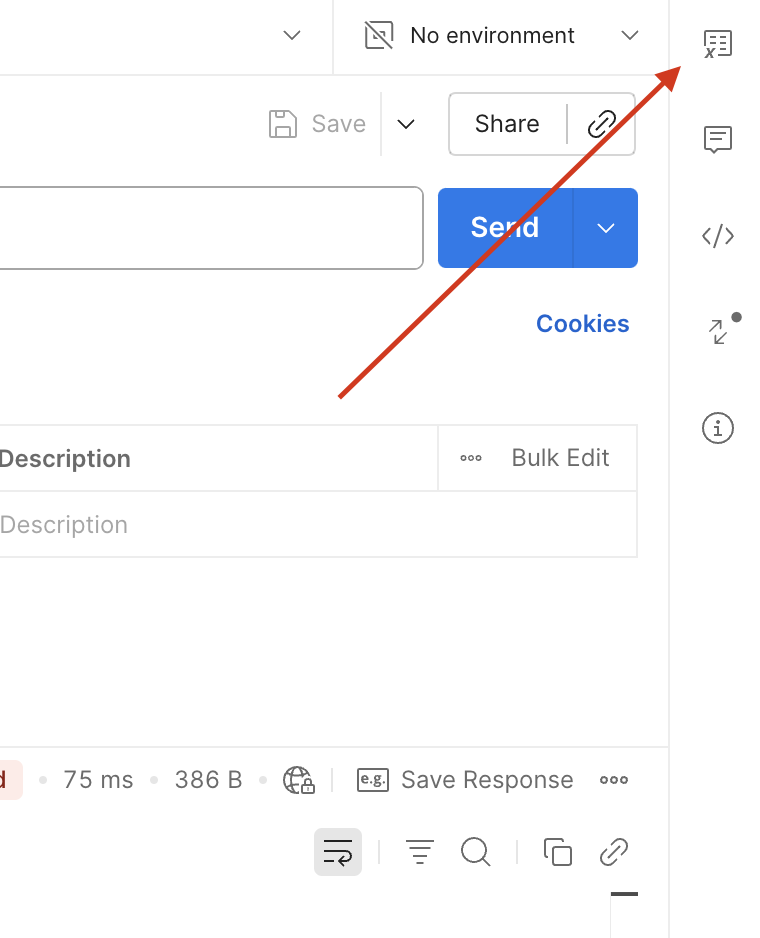
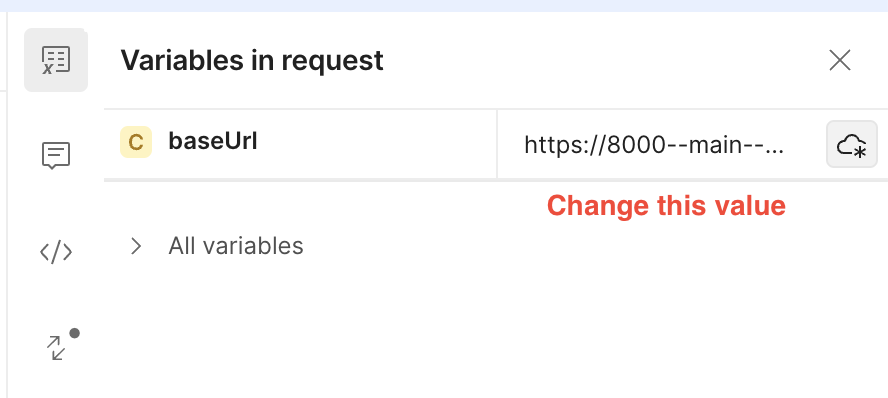
Ensure the variable name is baseUrl (case sensitive) and its value is the URL of your app (most likely http://localhost:8000)
Then press save.
You should then be able to test out the API endpoints in postman!
Congratulations for making it to the end. You have just implemented a RESTful API with authentication via JSON Web Tokens. This lab forms the core of the server side programming done in the course and is VERY important with respect to your assessments.
Exercise 1
Update the response datamodel for todos such that it also returns a list of category items. A single category item should show the ID of the category and the category's text
Exercise 2
Build out the following endpoints for category management
Route Name (AuthorizedUser Class) | Route | HTTP method | Description |
Create Category | /category | POST | Creates a category for the CURRENT LOGGED IN user |
Add Category to Todo | /todo/{todo_id}/category/{cat_id} | POST | Assigns the category |
Remove Category from Todo | /todo/{todo_id}/category/{cat_id} | DELETE | Removes the category |
Get todos for category | /category/{cat_id}/todos | GET | Retrieves ALL todos for the category |