The codebase from last week has a single class (User) and operations you can perform on a User class. We're going to introduce a new scenario that uses the codebase.
The remainder of the lab will be done under the context that this is a Todo App
From the codebase from last week we'd modify it to add the models we'd need. If you were unable to complete the lab last week, you can use this codebase as a starting point. Remember to fork the repository so that you have your own copy on your own account instead of cloning the repository that belongs to DCIT.
Now we want to make our second model which saves the To-Dos in our To-Do application. Because To-Do's must belong to a logged in user we need to set up a 1 to many relationship between a User and a To-Do.
We want to build a todo application, try to create a model that follows the table structure below. A model diagram is given below to show the relationship between todo and user. An association arrow is used to link the Todo.user_id foreign key to User.id
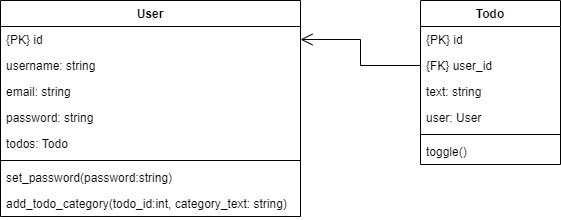
Most of the model would be very similar to user however, todo as a foreign key, this implemented as shown below
Task 2.1
Implement the Todo model according to the spec above. Note toggle() is a method that switches the boolean state of the done field.
class Todo(SQLModel, table=True):
    id: Optional[int] =  Field(default=None, primary_key=True)
    user_id: int = Field(foreign_key='user.id') #set user_id as a foreign key to user.id
    text: str = Field(max_length=255)
    done: bool = Field(default=False)
    # done: bool = False  # <---- can also be written this way if you prefer a pythonic default

    def toggle(self):
        self.done = not self.done
We specify the foreign_key attribute on the user_id property to link this table to User. This way we establish a 1 to Many relationship from User to Todo.
Before we test, we are going to add relationship fields to our models. This is a powerful abstraction that makes all related objects available from an object of a different model. i.e. User objects compose their corresponding todo objects.
Task 3.1
Update User in models.py to add a todos field
class User(SQLModel, table=True):
    id: Optional[int] =  Field(default=None, primary_key=True)
    username:str = Field(index=True, unique=True)
    email:str = Field(index=True, unique=True)
    password:str

    todos: list['Todo'] = Relationship(back_populates="user")
Task 3.2
Update the Todo model in models.py to add a user field
class Todo(SQLModel, table=True):
    id: Optional[int] =  Field(default=None, primary_key=True)
    user_id: int = Field(foreign_key='user.id') #set user_id as a foreign key to user.id
    text: str = Field(max_length=255)
    done: bool = Field(default=False)
    # done: bool = False  # <---- can also be written this way if you prefer a pythonic default

    user: User = Relationship(back_populates="todos")
Explaination
From the User class
- If you have access to a
Userobject. That object would have a property calledtodos. - The
todosproperty of the user object is a mapping to MANY (a list of)Todoobjects thats pertains to that user - You can treat the
todosproperty as a regular list and append items to it, SQLModel will handle the underlying mappings and ensure the foreign_keys are set up accordingly - The
back_populatesstate that there should be a property on theTodoclass that is named user. This property on theTodoclass should reference that user object.
From the Todo class
- If you have access to a
Todoobject. That object would have a property calleduser. - The
userproperty of the todo object is a mapping to a SINGLEUserobject. - SQLModel automatically determines that the
user_idparameter of the model should be used to lookup the User - The
back_popualtesstate that there should be a property on theUserclass called todos.
Why would I do this?
There are a number of scenarios that the use of relationships are easier to handle
- Given an instance of the
Userclass, add to their list of Todos - Given an instance of the
Todoclass, who is the user that created it - etc
Task 3.3
Run the command python app/cli.py initialize and inspect the database to see the data. You should see
- 2 tables are in the database (User and Todo)
- The User table has an entry for a user (bob)
- The Todo table has an entry for a task (wash dishes) that belongs to a user with ID 1 (bob)
Task 3.4
Add a new function in the Todo class that would be used to toggle the todo item such that if an item was marked as completed before, it would be updated so that it's not completed and vice versa
def toggle(self):
    self.done = not self.done
While the initialize command in cli.py file adds a default todo for us, let's make a command to create them individually.
Task 4.1
Implement an add todo command that takes a CLI argument of the username and the text of the item and stores it to the user if the user exists.
@cli.command()
def add_task(username:str, task:str):
    with get_session() as db:
        user = db.exec(select(User).where(User.username == username)).one_or_none()
        if not user:
            print("User doesn't exist")
            return
        user.todos.append(Todo(text=task))
        db.add(user)
        db.commit()
        print("Task added for user")
Test the command by executing python app/cli.py add-task bob "Wash the car" (note the use of quotations to take a space separated string as a single argument)
Verify the newly added row of data in the todo table
Task 4.2
Next we implement a command that lets users toggle the done state of their todo
@cli.command()
def toggle_todo(todo_id:int, username:str):
    with get_session() as db:
        todo = db.exec(select(Todo).where(Todo.id == todo_id)).one_or_none()
        if not todo:
            print("This todo doesn't exist")
            return
        if todo.user.username != username:
            print(f"This todo doesn't belong to {username}")
            return

        todo.toggle()
        db.add(todo)
        db.commit()

        print(f"Todo item's done state set to {todo.done}")
Test the function by executing python3 app/cli.py toggle-todo 1 bob
- What happens if that command is executed multiple times?
- What happens if you set the ID to a todo that doesn't exist?
- What happens if you change the username to a user that doesn't exist?
Inspect the database file to see the changes. You may have to reload the database by pressing the refresh icon at the top left (above the table listing) after running commands
Often we may need to model many to many relationships in your applications. For example, let's add a category model such that todos can belong to many categories and a category can contain many todos.
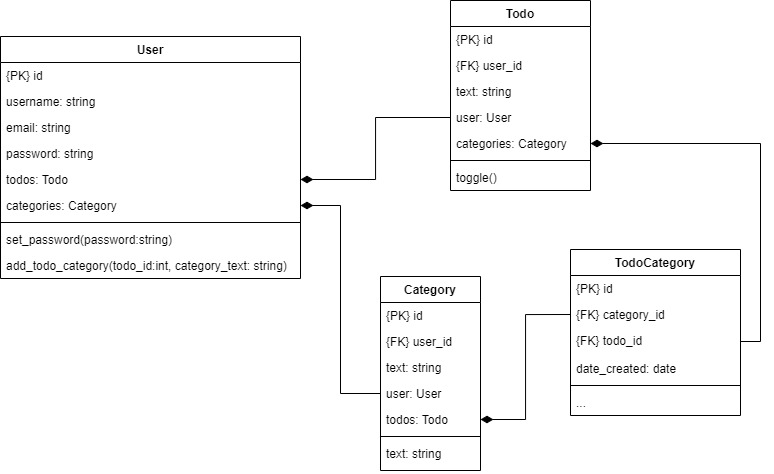
Task 5.1
Add the following models to models.py
class TodoCategory(SQLModel, table=True):
    todo_id: int|None = Field(primary_key=True, foreign_key='todo.id')
    category_id: int|None = Field(primary_key=True, foreign_key='category.id')

class Category(SQLModel, table=True):
    id: Optional[int] =  Field(default=None, primary_key=True)
    user_id: int = Field(foreign_key='user.id') #set user_id as a foreign key to user.id
    text: str = Field(max_length=255)

    todos: list['Todo'] = Relationship(back_populates=("categories"), link_model=TodoCategory)
Task 5.2
Add modify the Todo class and add a relationship field categories
categories: list['Category'] = Relationship(back_populates=("todos"), link_model=TodoCategory)
Task 5.3
Create a new CLI command to list the todo categories for a specified todo_id verifying first that it belongs to the user specified
@cli.command()
def list_todo_categories(todo_id:int, username:str):
    with get_session() as db: # Get a connection to the database
        todo = db.exec(select(Todo).where(Todo.id == todo_id)).one_or_none()
        if not todo:
            print("Todo doesn't exist")
        elif not todo.user.username == username:
            print("Todo doesn't belong to that user")
        else:
            print(f"Categories: {todo.categories}")
Task 5.4
Create a command to add a category for a user. Ensure that the category doesn't exist first before creation.
@cli.command()
def create_category(username:str, cat_text:str):
    with get_session() as db: # Get a connection to the database
        user = db.exec(select(User).where(User.username == username)).one_or_none()
        if not user:
            print("User doesn't exist")
            return

        category = db.exec(select(Category).where(Category.text== cat_text, Category.user_id == user.id)).one_or_none()
        if category:
            print("Category exists! Skipping creation")
            return

        category = Category(text=cat_text, user_id=user.id)
        db.add(category)
        db.commit()

        print("Category added for user")
Task 5.5
Create a command to see the list of categories a user created.
@cli.command()
def list_user_categories(username:str):
    with get_session() as db: # Get a connection to the database
        user = db.exec(select(User).where(User.username == username)).one_or_none()
        if not user:
            print("User doesn't exist")
            return
        categories = db.exec(select(Category).where(Category.user_id == user.id)).all()
        print([category.text for category in categories])
Task 5.6
Create a command to assign a category to a todo given the arguments (username, todo_id, category). The command should check to see if the user has that category, if it doesn't it should be created. The todo should exist and belong to the user. Verify the functionality with the command for task 5.3 above
@cli.command()
def assign_category_to_todo(username:str, todo_id:int, category_text:str):
    with get_session() as db: # Get a connection to the database
        user = db.exec(select(User).where(User.username == username)).one_or_none()
        if not user:
            print("User doesn't exist")
            return

        category = db.exec(select(Category).where(Category.text == category_text, Category.user_id==user.id)).one_or_none()
        if not category:
            category = Category(text=category_text, user_id=user.id)
            db.add(category)
            db.commit()
            print("Category didn't exist for user, creating it")

        todo = db.exec(select(Todo).where(Todo.id == todo_id, Todo.user_id==user.id)).one_or_none()
        if not todo:
            print("Todo doesn't exist for user")
            return

        todo.categories.append(category)
        db.add(todo)
        db.commit()
        print("Added category to todo")

Thus concludes your introduction to SQLModel. The usage of this library is at the very core of this course.
Write CLI commands to do the following:
- Output each todo's ID, text, username and done status.
- Delete a todo by ID.
- Mark all of a user's todos as complete